SaaS · microsoft-365, licensing, security, entra-id, buyer-guide
Microsoft 365 E3 vs E5: what the $21 security step buys
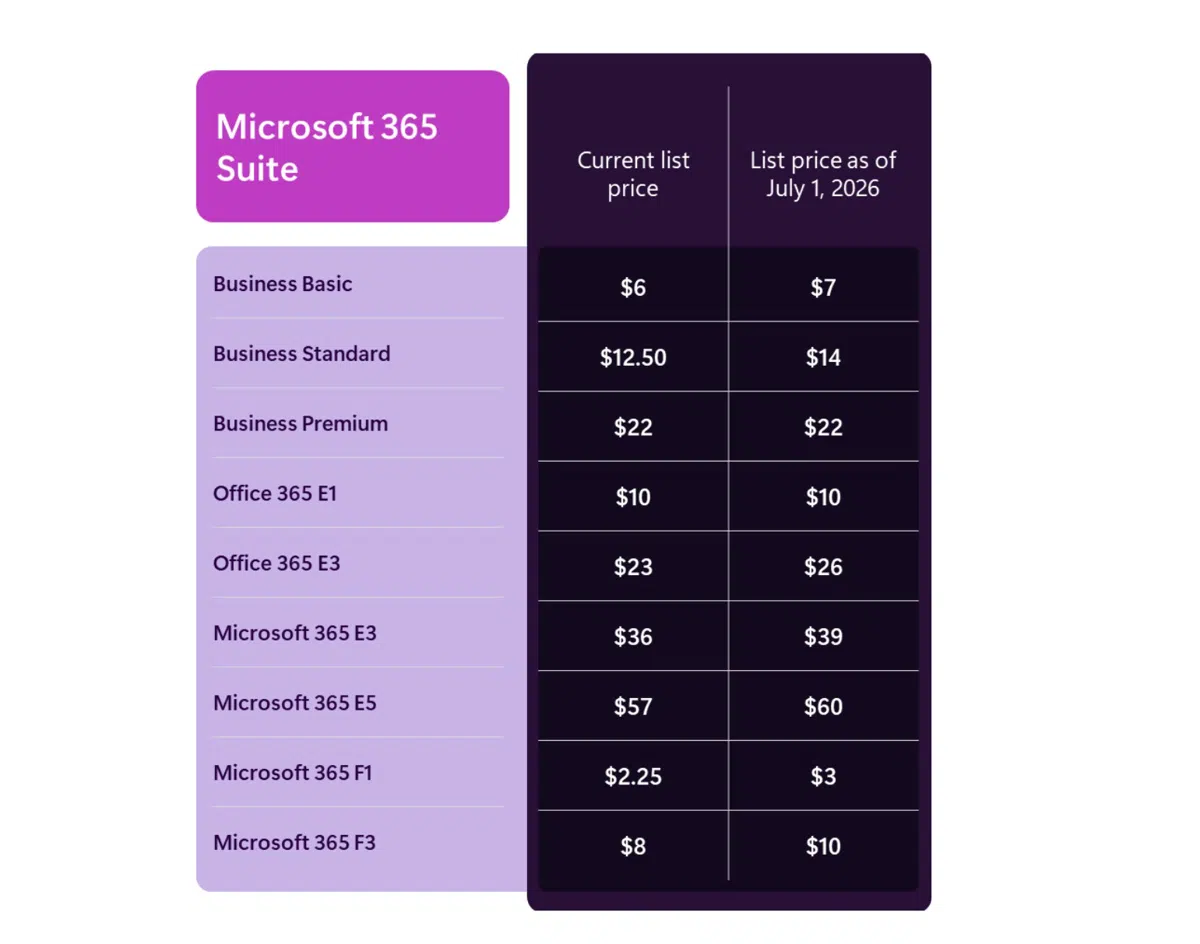
E3 lists at $39 and E5 at $60 per user per month. The gap is mostly identity, audit and eDiscovery; Microsoft closed the basic email-protection gap in July 2026.
 SaaS
Key points
- Microsoft 365 E3 lists at $39.00 and E5 at $60.00 per user per month on an annual commitment, a $21 gap worth $252 per seat per year.
- Since July 1, 2026, E3 includes Defender for Office 365 Plan 1, so Safe Links, Safe Attachments and anti-phishing are no longer the reason to buy E5.
- The larger gap is identity: risk-based Conditional Access, Identity Protection and Privileged Identity Management require Entra ID P2, which E5 carries and E3 does not.
The $21 gap is mostly security and compliance
The list price is $39.00 per user per month for Microsoft 365 E3 and $60.00 for E5, both on an annual commitment. That puts the step at $21 per seat per month, or $252 a year at list.
What sits behind that step has changed. Microsoft made Defender for Office 365 Plan 1 part of Microsoft 365 E3 on July 1, 2026. Safe Links, Safe Attachments and real-time detections now arrive with E3, which removes the simplest argument for E5: that E3 leaves email on the basic Exchange protection.
The remaining case for E5 is narrower and more expensive to replicate. It is the difference between seeing an incident and being able to investigate, contain and retain the evidence for it, across identity, email and the compliance record.
Identity is where the first real gap sits
E3 carries Microsoft Entra ID P1. E5 carries Entra ID P2, and three capabilities sit only on the P2 side of that line in Microsoft's own licensing table: risk-based Conditional Access, Identity Protection and Privileged Identity Management. Ordinary Conditional Access is a P1 feature; making a policy react to sign-in risk is not.
In practice, P1 gives a team location and device conditions. P2 adds the risk signal and the time-bound admin role. Without PIM, permanent global administrator assignments stay permanent, and the access review that would catch them is a manual exercise rather than a product feature.
That difference is not visible on a feature comparison slide. It appears in an incident review, when the question is which sign-ins were already flagged as risky and who could have approved a role activation. If the identity team already standardizes on P2 through a standalone add-on, the E5 step buys less than the price sheet suggests.
| Microsoft 365 E3 | Microsoft 365 E5 | |
|---|---|---|
| List price, annual commitment | $39.00 per user/month | $60.00 per user/month |
| Identity tier | Entra ID P1 | Entra ID P2 |
| Risk-based Conditional Access | No | Yes |
| Privileged Identity Management | No | Yes |
| Defender for Office 365 | Plan 1 | Plan 2 |
| Automated investigation and response | No | Yes |
| Audit | Standard | Premium, one-year retention |
| eDiscovery | Standard | Premium |
| Automatic sensitivity labeling | No | Yes |
Advertisement
Email: Plan 1 closes protection, Plan 2 buys response time
Defender for Office 365 Plan 1 covers Safe Attachments, Safe Links, anti-phishing policies, real-time reports and protection for SharePoint, OneDrive and Teams. It is the blocking layer, and since July 2026 it is included in E3.
Plan 2 adds the work that starts after a message is delivered: automated investigation and response, attack simulation training, threat trackers, campaign views and integration with Microsoft Defender XDR. Those are the tools a security operations team uses to scope a campaign across mailboxes rather than deleting one message at a time.
An organization that already runs a third-party email security or XDR platform may not need Plan 2 at all, and should price the standalone add-on against the full E5 step. An organization whose email incident response is two administrators and a mailbox search is buying the difference between hours and days.
Compliance: the audit and legal-hold ceiling
Both plans include Purview Audit Standard. Audit Premium, which retains audit records for up to one year and supports custom audit retention policies and high-value events, is an E5 capability. eDiscovery follows the same pattern: standard search and hold are in both, while eDiscovery Premium, with custodians and review sets, is E5 only.
Sensitivity labeling is the third split. Manual labeling is available in E3, but automatic and policy-based labeling requires E5, as do advanced DLP policy tips and endpoint DLP. For a team that labels documents by hand and hopes, that is a process risk rather than a license gap; for one under a regulator's remediation plan, it is the gap that matters.
The decision point is not the audit dashboard. It is the first legal hold or regulator request that asks for a custodian, a date range and a defensible export. E3 can produce content; E5 produces the case workflow around it.
Advertisement
The seat count is larger than the security team
Purview licensing follows the data, not the administrator. Any user who benefits from a Purview feature needs the license, and a shared or resource mailbox needs an E5-class license to receive E5 usage rights. A policy that covers every mailbox therefore licenses every mailbox, however small the compliance team is.
This is where a pilot budget goes wrong. Buying E5 for twenty security and legal staff leaves the other eight hundred mailboxes unlicensed for the retention and eDiscovery policies, which is the population a legal case will actually touch. The honest comparison is E5 across the in-scope population against E3 plus targeted add-ons for the same population.
Assignment is per user in the Microsoft 365 admin center, so a tenant can hold more than one SKU. The work is defining which users touch regulated data and which simply need a mailbox and a document library.
The decision rule
Choose E5 when the in-scope population is most of the tenant, when counsel or a regulator has asked for retention and eDiscovery Premium, or when the identity team needs risk-based policy and PIM and has no standalone P2. In those cases the $252 per seat per year replaces several point products and a manual process.
Stay on E3 when the regulated population is small, when a third-party platform already covers hunting and response, and when Audit Standard and eDiscovery Standard meet the actual obligation. Add Entra ID P2 or Defender for Office 365 Plan 2 only for the users who need them, and revisit the split at renewal rather than at the next incident.
The first number to pull is not the license price. It is the count of mailboxes and sites that a legal hold would cover. That count decides whether the $21 is a bargain or a subsidy for seats that will never use the feature.
Advertisement
Sources 5